 Matribhumi Samachar English


Lucknow. Tuesday, 30 June 2026
A UP Domicile Certificate (Residence Certificate) is an essential legal document issued by the Revenue Department of Uttar Pradesh. It officially validates that an individual is a permanent resident of the state. Whether you are applying for state government jobs, securing a seat in educational institutions through state quotas, or claiming benefits under various welfare and scholarship schemes, this certificate serves as your primary proof of residency.
Key Information Table
| Feature | Details |
| Issuing Authority | Revenue Department, Government of Uttar Pradesh |
| Application Mode | Online via eDistrict (eSathi) Portal / Offline via Tehsil or CSC |
| Standard Processing Time | 15 to 20 Working Days |
| Official Validity | Permanent (unless residence status changes or cancelled) |
| Primary Portal | eDistrict Uttar Pradesh |
Eligibility Criteria
To be eligible to apply for a residence certificate in Uttar Pradesh, you must satisfy the following conditions:
-
You must be a permanent resident of Uttar Pradesh.
-
You must possess valid identity and residential address proofs.
-
You must fulfill specific residency duration terms as regulated by the state government.
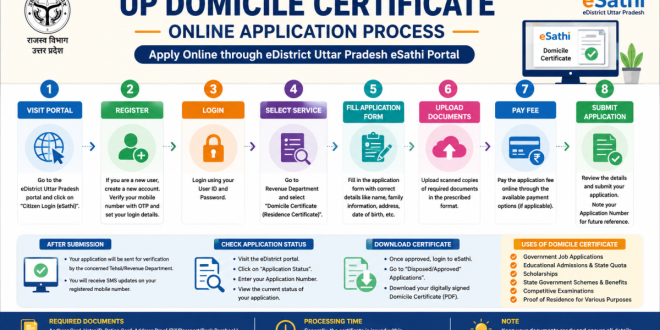
Step-by-Step Guide: How to Apply Online
Applying for your certificate digitally is convenient. Follow this sequential breakdown to navigate the official eDistrict Uttar Pradesh portal smoothly.
Alternative Offline Application Method
If you prefer an offline method or lack stable internet access, you can still apply through traditional channels:
-
Collect the physical application form from your local Tehsil Office or an authorized Common Service Centre (CSC).
-
Fill out the form manually and attach photocopies of all required identification documents.
-
Submit the completed packet at the counter and collect your physical acknowledgment receipt containing your application tracking number.
Tracking Status and Downloading Your Certificate
Once your application is submitted, it undergoes verification by the designated local revenue officers (Lekhpal/Tehsildar).
-
To Track Application Status: Visit the main eDistrict portal homepage, click on the Application Status tab, enter your Application Number, and view the live tracking updates.
-
To Download the Certificate: Once the status shows “Approved”, log back into your eSathi dashboard. Navigate to the Disposed Applications folder, click on ‘Domicile’, and download your digitally signed, legally valid PDF certificate.
Frequently Asked Questions (FAQs)
Is a UP Domicile Certificate different from a Residence Certificate?
No. In Uttar Pradesh, the terms Domicile Certificate and Residence Certificate refer to the exact same document and are used interchangeably.
How long does it take to get the certificate issued?
The standard turnaround time is approximately 15 to 20 working days following a successful background verification by the Revenue Department.
What is the validity period of a UP Domicile Certificate?
It generally carries lifetime validity as long as your permanent residence status does not change to another state or it is revoked by authorities due to misinformation.
Disclaimer & External Resources
-
Disclaimer: This article is prepared strictly for informational purposes based on public administrative procedures. Application fees, portal layouts, and processing schedules are subject to amendments by the Government of Uttar Pradesh. Applicants are encouraged to verify live guidelines directly on the state portal.
-
Relevant News: To explore contemporary governance, infrastructure updates, and community welfare articles across India, visit Matribhumi Samachar English.