 Matribhumi Samachar English


Lucknow. Friday, 26 June 2026
The digital revolution has fundamentally transformed how we interact with government services. Gone are the days of standing in long, exhausting queues at local government offices just to get a basic document signed. Through the UP e-District online portal, the Government of Uttar Pradesh has brought essential public administration straight to your fingertips, offering unprecedented convenience, transparency, and speed.
Whether you are a student applying for a scholarship needing an income certificate, a job seeker requiring a character certificate, or a resident securing a domicile document, this comprehensive guide will walk you through everything you need to know to navigate the system like a pro.
What is the UP e-District Initiative?
The UP e-District portal is an integrated, citizen-centric digital platform designed to link district administrations, tehsil offices, and various state departments. By digitizing administrative processing, the platform aims to minimize paperwork, accelerate application processing times, and reduce the need for physical visits to government offices.
For citizens who prefer hands-on assistance or lack reliable internet access, the state has also integrated this portal with a vast network of authorized Common Service Centres (CSCs), ensuring that digital governance reaches every corner of Uttar Pradesh.
Key Services Available and Documentation Checklists
The portal hosts dozens of services across multiple departments. Having your paperwork perfectly scanned and ready before you log in is the absolute best way to ensure a seamless approval process.
1. Revenue Department Certificates
-
Income Certificate: Essential for scholarship applications and fee concessions.
-
What you need: Identity proof, recent passport-size photograph, structural income proof, address proof, and a self-declaration form.
-
-
Caste Certificate: Required to claim reservation benefits in education and employment.
-
What you need: Identity proof, existing family caste proof (if available), and local residence documentation.
-
-
Domicile (Residence) Certificate: Proves your permanent residency within the state for educational admissions and state government jobs.
-
What you need: Identity proof, utility bills or ration card copies, and school records or birth certificates confirming your history in the state.
-
2. Social Welfare and Administrative Services
Beyond basic certificates, the portal acts as a gateway for:
-
Pension Scheme Applications: Old age, widow, and disability pension document processing.
-
Employment Registration: Streamlining your status with local employment exchanges.
-
District-Specific Administrative Requests: Including local character certificates, solvency certificates, and certified copies of the Family Register.
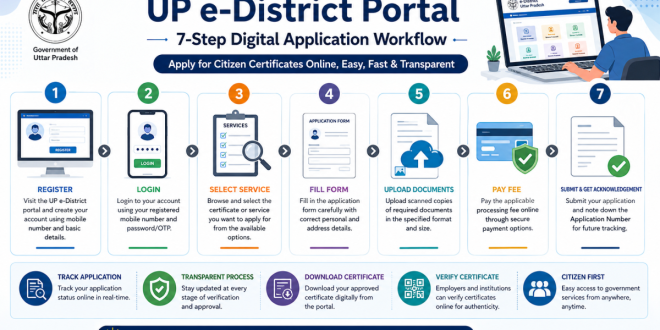
How to Apply on the UP e-District Online Portal
Applying for your required documents online is a straightforward, logical sequence. Follow these steps carefully to ensure your application enters the system correctly.
Tracking and Managing Your Digital Application
Once submitted, you don’t have to guess where your paperwork is. The portal allows real-time tracking by simply entering your unique application number on the homepage tracking bar.
Typical Lifecycle Stages:
Application Submitted → Under Verification (with local officers) → Approved / Rejected → Digital Certificate Generated
Once the status shifts to “Certificate Generated,” you can digitally download the official document directly to your device. These certificates come with digital signatures and online verification features, allowing external authorities (like employers or universities) to verify their authenticity securely without requiring a physical stamp.
Smart Tips to Prevent Application Rejection
A large percentage of application delays or rejections are completely preventable. Keep these practices in mind:
-
Legible Uploads: Ensure document scans are not blurry, cut off, or poorly lit.
-
Data Matching: Ensure details like your date of birth or spelling of your name match exactly across your identity proofs and the application form.
-
Stay Responsive: Keep your registered mobile number active; local verification officers or cross-checking authorities may occasionally call or SMS if they require clarity.
Frequently Asked Questions (FAQs)
Can I access the UP e-District online portal at any time?
Yes, the online platform accepts citizen submissions 24 hours a day, 7 days a week. However, note that administrative verification and processing by government officials occur strictly during standard government working hours.
What should I do if I don’t have internet access or a scanner?
If you face technical limitations, you can comfortably walk into any authorized local Common Service Centre (CSC) across Uttar Pradesh. The operators there can scan your documents and submit the application on your behalf for a nominal fee.
Do I need specific identity verification documents to apply?
Yes, local department regulations often require standard government-issued identity or residency tools to establish legal verification before issuing official certificates. Check the individual service checklist prior to filing.
How long does it typically take for a certificate to be approved?
Processing timelines are variable. They depend directly on the type of service requested, current administrative workloads at the local tehsil or district level, and the physical verification steps required by field officials.
Disclaimer
This article is compiled for informational and educational purposes based on standard operational procedures of digital governance portals in Uttar Pradesh. Rules, portal layouts, document lists, and processing fees are subject to direct changes by the respective state government departments. Citizens are advised to refer directly to official administrative channels for the most recent updates.
Note on External Resources: While we aim to provide comprehensive local press updates and guides, direct information regarding specific news loops can be tracked via regional portals like Matribhumi Samachar.